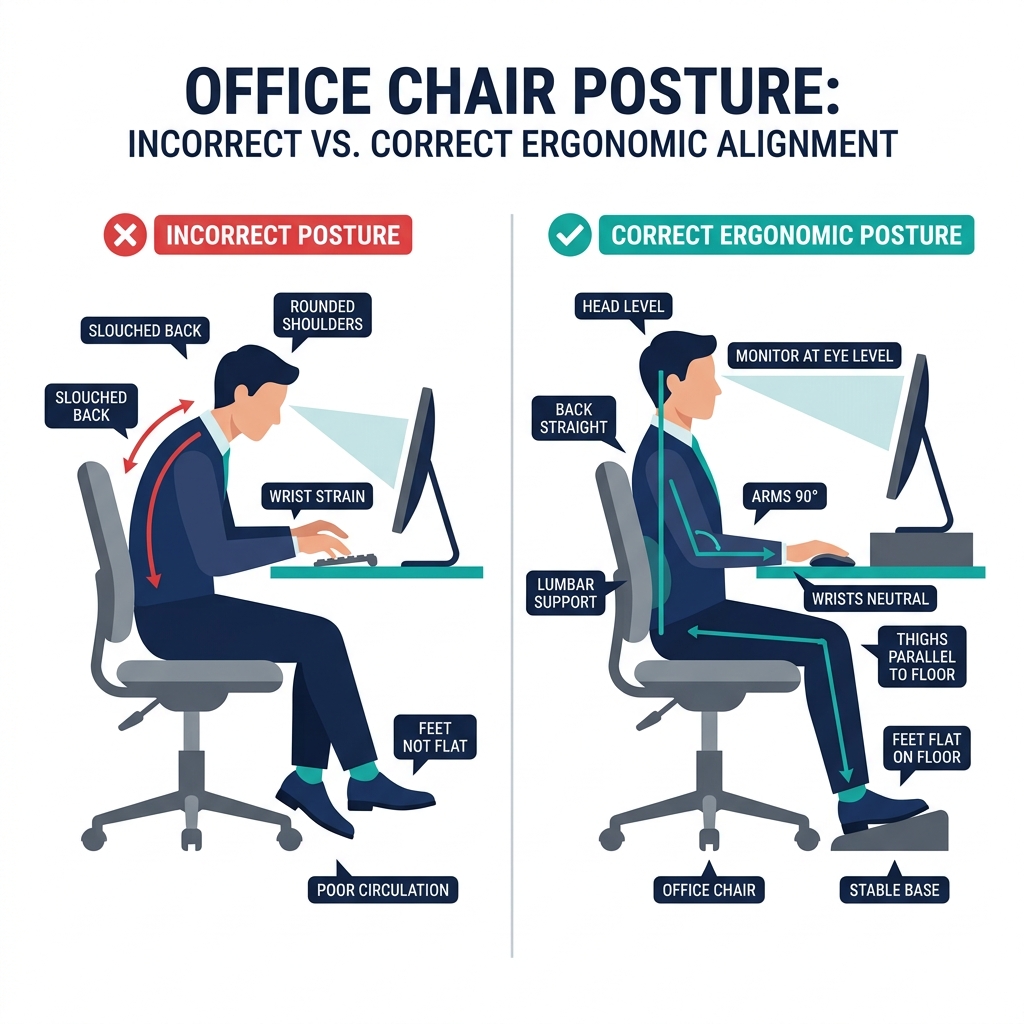
Most people adjust their posture once they feel pain. By then, the damage has already begun.
The key to great posture isn’t willpower — it’s removing the friction between your body and your environment. When your chair, desk, and screen are set up correctly, good posture happens almost automatically.
Here are 10 tips that actually work.
Why Office Chair Posture Matters More Than You Think
Prolonged poor posture doesn’t just cause back pain — it:
- Compresses intervertebral discs (leading to herniation over time)
- Reduces lung capacity by up to 30% (slouching compresses your diaphragm)
- Increases cortisol levels (triggering fatigue and brain fog)
- Impairs blood circulation to the lower body
The good news: correcting your posture has measurable health benefits within 2–4 weeks of consistent practice.
Tip 1: Set Your Chair Height First
Everything starts here. Sit fully back in your chair, then adjust height until:
- Feet are flat on the floor (or footrest)
- Thighs are parallel to the ground or slope slightly down
- Knees are at 90° or slightly more open
Never let your feet dangle — it cuts off circulation and forces your hip flexors to compensate.
Tip 2: Use the Lumbar Support (Actually Use It)
Most ergonomic chairs have lumbar support that goes unadjusted. Position it so it supports the curve at the small of your back — around belt height.
If your chair doesn’t have proper lumbar support, a rolled towel or a dedicated back cushion works surprisingly well. The goal is to maintain your spine’s natural S-curve.
Tip 3: Sit Back, Not Forward
This one sounds simple but it’s something most people never do consistently. Scoot your hips all the way back until your lower back touches the backrest fully.
Sitting on the edge of your chair is one of the fastest paths to lower back fatigue. Your chair’s lumbar support only works when you’re fully seated against it.
Tip 4: Address Seat Discomfort — It Changes Everything
If your chair seat is too firm, too flat, or creates pressure on your tailbone or sit bones, you will instinctively shift your position constantly — destroying your posture throughout the day.
A quality posture correcting seat pad can correct this issue without replacing your entire chair. Look for cushions that:
- Have a coccyx cutout to relieve tailbone pressure
- Distribute weight across the full sitting surface
- Use memory foam or air cell technology for dynamic support
Tip 5: Neutral Wrists — Not Just for Carpal Tunnel Prevention
Your wrists should hover in a neutral position while typing — neither bent up (extension) nor bent down (flexion). This keeps tendons, muscles, and nerves aligned.
Adjust keyboard tilt and height until you achieve this. A wrist rest can help during breaks — but don’t rest on it while actively typing, as that creates localized pressure.
Tip 6: Eyes at Monitor Top (The Neck-Saver)
For every inch your head drops below neutral, your neck absorbs an extra 10 lbs of load. Position your monitor so the top of the screen is at or just below eye level.
If you work primarily on a laptop, this single issue is probably causing 80% of your neck pain. An external monitor or laptop stand is one of the highest-leverage investments in ergonomics.
Check out our full guide on monitor height ergonomics for exact measurements.
Tip 7: Relax Your Shoulders — Right Now
Tense, elevated shoulders are the second-most common posture error after monitor positioning. Check your armrest height: arms should rest at a height where your shoulders are completely relaxed and not shrugged.
If your armrests are too high, they push your shoulders up. Too low, and your arms dangle, pulling shoulder blades out of alignment.
Rule of thumb: lower your armrests until you feel your shoulders drop naturally.
Tip 8: Take Micro-Breaks Every 30 Minutes
No ergonomic setup in the world can fully compensate for unbroken sitting. Research is clear: movement is the best medicine.
Practical micro-break system:
- Every 30 minutes → stand, reach overhead, do 5 shoulder rolls
- Every 60 minutes → 5-minute walk (even just to the kitchen)
- Every 2 hours → 10 minutes of light stretching
Use a simple timer app or the Pomodoro technique. This alone can reduce musculoskeletal pain by up to 54% according to occupational health research.
Tip 9: Check Your Hip-to-Screen Line
Here’s a quick posture audit you can do right now:
- Sit naturally at your desk (don’t try to correct yourself yet)
- Look where your screen is relative to your eyes
- Feel where your lower back is relative to the backrest
If your eyes are looking down more than 15°, your monitor is too low. If your lower back isn’t touching the backrest, you’re perched forward.
Fix the environment, not just your posture. Read our ultimate ergonomic desk setup guide for the full calibration process.
Tip 10: Consistency Matters More Than Perfection
You don’t need perfect posture every second. You need good enough posture most of the time.
The practical goal: eliminate the extreme positions (chin jutting forward, full slouch, wrist compression) and keep returning to neutral throughout the day.
A simple sticky note on your monitor saying “Shoulders down. Back against chair.” is surprisingly effective.
Your Daily Posture Checklist
Morning setup (takes 2 minutes):
- Chair height: feet flat, knees 90°
- Lumbar support in contact with lower back
- Monitor top at eye level
- Shoulder tension check: relax them now
Midday check (every 2 hours):
- Am I sitting all the way back in my chair?
- Are my shoulders elevated?
- Is my chin jutting forward?
- When did I last stand up?
One More Overlooked Factor: Your Chair’s Seat Surface
Even with perfect posture practice, a hard or poorly contoured seat creates pressure hotspots that your body tries to escape by shifting position.
Upgrading to a better chair is ideal, but if that’s not in the budget, a well-designed pressure relief cushion is a fraction of the cost and makes an immediate difference to your sitting comfort and posture sustainability.
Ready for the full setup? Start with the Ultimate Ergonomic Desk Setup Guide — it covers everything from chair height to cable management in one complete reference.